


Amaze GO!
4.97.74K Reviews
App Specs
- Version
- 1.32.0
- Updated On
- License
- Free
- Downloads
- 100,000,000+
- Developer
- Oakever Games
- Categories
- Puzzle
- Platform
- Android
Screenshots
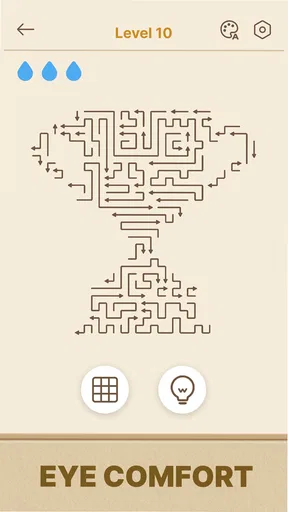

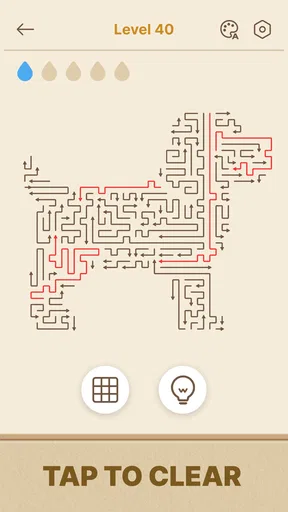
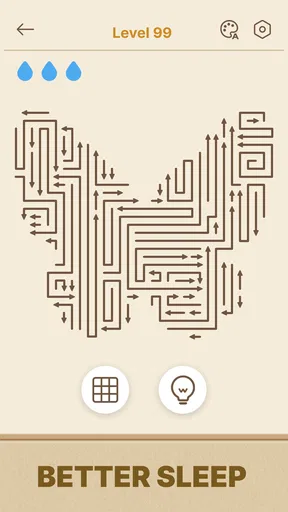
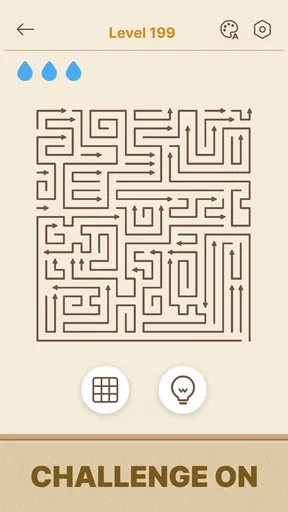



 Analysis by AppCompare
I’m drawn to puzzle games that give me a clear problem to think through without asking me to learn a complicated control scheme first. Arrows GO! fits that mood: its arrow-based puzzles are easy to understand at a glance, but planning a route and working out the right order can take more thought than the simple premise suggests. I’d reach for it when I want a focused little challenge rather than a sprawling game to manage.
Where the game stands now
This is a free puzzle game from Oakever Games, built around clearing arrows and figuring out how each puzzle can be solved. The straightforward idea makes it approachable, while the need to consider how the arrows interact gives each board a bit of mental weight. It is the kind of game I can imagine opening during a quiet moment, when I want to concentrate for a while without committing to a long session.
The game currently sits at version 1.15.1. That is useful context for anyone deciding whether to try it: this is an established release rather than a first public build, but a version number alone does not tell me exactly what has changed between releases. I would treat the current version as the one to judge on its present experience, not as proof of any particular feature or recent overhaul.
What the puzzle loop asks of you
The central appeal is spatial reasoning. Instead of relying on quick reflexes, I have to look at the arrows, understand which paths need to be cleared, and avoid making a move that leaves the board harder to resolve. That makes the game a better fit for players who enjoy pausing to inspect a puzzle than for anyone looking for action or a fast reaction test.
A practical way to approach a crowded board is to resist tapping the first arrow that looks easy. I’d scan for paths that seem blocked by other pieces, then consider whether clearing one arrow will open space for several others. This small habit makes the puzzle feel less like trial and error and more like a sequence of decisions. If a move creates a dead end, it is worth stepping back and looking at the whole layout again rather than repeating the same choice.
Who will enjoy it—and who may not
I’d recommend giving it a try if you like compact logic challenges, enjoy spotting patterns, or want a phone game that can occupy a short break without demanding a deep story or complicated setup. Its Everyone content rating also makes it broadly suitable in terms of age classification, though whether its puzzle style is enjoyable will depend on the person playing.
It may be a poor match if you prefer levels that reward speed, a strong narrative, character progression, or direct competition as the main attraction. The appeal here is the act of solving the board. Players who find it frustrating to stop and reconsider a move may prefer a more forgiving casual game, while fans of elaborate logic puzzles might eventually want a deeper challenge than a mobile puzzle loop can provide.
Worth Reading Before You Choose

Flipboard Shows What News Apps Must Do Beyond the Feed

Switching to Android Auto Means Rethinking Your Driving Routine

Google Calendar Makes a Crowded Week Easier to Manage

Ludo King Makes the Most of the Minutes Between Plans

Baby Panda World Brings Quick Play to Modern Phones, but Its Game Library Feels Busy

ESPN’s Live Game View Makes Following Close Games Easier
How it compares with other puzzle games
Compared with word games, number puzzles, or match-and-clear games, Arrows GO! asks for a more visual kind of reasoning. You are thinking about direction and space rather than vocabulary, arithmetic, or matching colors. That makes it a refreshing alternative if those familiar formats have started to feel repetitive, but it also means it will not scratch the same itch as a crossword or a number grid.
For a casual player, its main trade-off is focus: it offers a clear puzzle task, but the satisfaction depends on whether you enjoy working through a board rather than collecting rewards or following a story. I would choose it over a reflex-based arcade game when I want to slow down and think; I would choose a richer puzzle adventure when I want varied mechanics, a campaign, or a larger sense of progression.
Getting Started with Arrows GO!
First things first, Arrows GO! is available for both Android and iOS, which means you can dive into the action whether you’re Team Android or Team Apple. The download and installation process is smooth as butter, and within minutes, I was ready to steer my way through the game’s intricate puzzles.
When you first open the app, you’re welcomed by a clean, intuitive interface. The minimalistic design is a big win, making it easy to navigate without unnecessary distractions. The game’s premise is simple: guide arrows to their respective targets. But don’t let that fool you — the simplicity of the concept is beautifully deceptive, offering layers of challenges that require both strategy and precision.
Diving into Gameplay
The gameplay in Arrows GO! is all about directing arrows along predefined paths to hit their targets. Sounds straightforward, right? Well, as you advance, the levels become increasingly complex, with multiple arrows to direct and obstacles to avoid. Each level is like a mini puzzle that demands your full attention and strategic thinking.
What I love about Arrows GO! is how it balances difficulty with playability. The initial levels ease you in, giving you a feel for the mechanics before ramping up the challenge. And then, just when you think you’ve got it all figured out, the game throws in new elements like moving barriers or timed events that keep you on your toes.
Why It’s So Addictive
So, why can’t I stop playing? For starters, the sense of accomplishment after solving a particularly tricky level is incredibly satisfying. It’s like a mini victory, and who doesn’t love that rush of dopamine? Plus, the game’s design encourages you to think outside the box. There’s always more than one way to tackle a problem, and finding the most efficient solution is part of the fun.
Another aspect that keeps me coming back is the competitive edge. Arrows GO! includes leaderboards, so you can see how your skills measure up against players worldwide. It’s a great motivation to keep improving and aiming for that top spot.
Perfect for On-the-Go Gaming
One of the standout features of Arrows GO! is its suitability for quick gaming sessions. Whether you’re waiting for your coffee or on a break at work, you can easily pick it up, play a few levels, and put it down without feeling like you need to commit hours at a time. Each level only takes a couple of minutes to complete, making it perfect for those short bursts of productivity (or procrastination).
The game doesn’t require an internet connection after downloading, which is a huge plus for me. I can play anywhere, anytime, without worrying about data usage or spotty Wi-Fi. It’s just you, your phone, and the arrows waiting to be guided.
A Few Final Thoughts
In a sea of mobile games, Arrows GO! stands out with its clever design and engaging gameplay. It’s a game that’s easy to pick up but hard to put down, and it keeps getting better with each update. If you’re a fan of puzzle games that challenge your brain and offer endless entertainment, this app is a must-try.
The developers are consistently adding new levels and features, ensuring that there’s always something fresh to look forward to. Plus, with its vibrant community of players, you can always find tips and tricks if you ever get stuck.
So, if you’re looking for a game that’s both fun and mentally stimulating, give Arrows GO! a shot. Trust me, it’ll quickly become a staple on your device, just like it has on mine.
Everyday play and useful habits
A realistic way I’d use this game is to open it while waiting for a bus or during a short lunch break, solve one board, and then put my phone away. The visual nature of the puzzles makes it easy to return to the central task without needing to remember a plot or a long chain of instructions. Still, I would avoid starting a level when I only have a few seconds: a tricky layout is more enjoyable when I can give it calm attention rather than rush through taps.
When a board feels confusing, I find it useful to identify the arrows that have the least room to move first. Then I look for a move that creates options instead of simply removing one obvious piece. That is a general solving approach rather than a promise that every puzzle has a single best sequence. It helps me avoid tapping randomly, and it also makes a failed attempt informative: I can see which assumption about the paths was wrong.
Progress, expectations, and practical limits
The game has a 4.6 average from around 89,000 ratings, and it has passed 10 million installs. Those figures suggest that its simple puzzle premise has found a sizable audience, but popularity is not a substitute for personal fit. If you enjoy visual route-clearing challenges, the core idea is easy to test for yourself; if you mainly want a story, social play, or a broad collection of puzzle types, those audience numbers should not be the reason you choose it.
Its current version is 1.15.1, and the release date is February 13, 2026. I would not read those facts as evidence of particular additions or changes without a clear version history. For existing players, the sensible question is whether the current build still provides the kind of boards they enjoy and whether it runs comfortably on their device. Android users need version 7.0 or later, which is worth checking before installing on an older phone.
One trade-off with a focused puzzle game is that a familiar core mechanic can become repetitive if you play for too long in one sitting. I would treat that as a reason to pace sessions, not necessarily as a flaw: returning after a break can make a board easier to assess with fresh eyes. If you want a steady stream of dramatically different activities, a multi-mode puzzle collection may suit you better.
What I would check before settling in
If you are wondering whether you need to be online, the experience described for the game is playable without a connection after downloading, which makes it handy for travel or places with unreliable Wi-Fi. I would still install it and open it once before a trip, rather than assume every first-run step will work offline. That simple check avoids discovering a setup snag when you are already away from a connection.
If you are deciding whether it is suitable for a younger player, its Everyone rating is reassuring as a content classification. I would still consider the child’s patience and interest in logic puzzles: a broad age rating does not mean every child will find the boards engaging, and younger players may appreciate an adult nearby when they want help thinking through a stuck position.
For someone who is stuck, my first suggestion is to pause and inspect the whole board rather than make several speculative moves in a row. Look for arrows whose paths depend on other pieces being cleared, then test the move that opens the most useful space. If repeated attempts stop feeling like learning and start feeling like frustration, taking a break is a better choice than forcing a solution; the game’s appeal is thoughtful problem-solving, not endurance.
My recommendation
Arrows GO! is best approached as a compact visual logic game: a good fit for short, focused sessions and for players who like turning a crowded arrangement into a workable sequence. It is less convincing as a choice for anyone seeking a narrative campaign, fast action, or a huge variety of puzzle styles. I’d try it if arrow-and-path reasoning sounds satisfying, and keep another genre handy if I want more variety.
Pros
- Smooth and intuitive controls.
- Vibrant and engaging graphics.
- Variety of challenging levels.
- Regular updates with new content.
- Compatible with low-end devices.
Cons
- Requires constant internet connection.
- Intrusive ads between levels.
- Limited free-to-play features.
- High battery consumption.
- Occasional lag on older devices.
FAQs for Amaze GO!
What is the main objective of Arrows GO!?
Arrows GO! is a dynamic puzzle game that challenges players to navigate various mazes using directional arrows. The main objective is to guide your character to the finish line by strategically placing or adjusting arrows on the path. Each level introduces new obstacles and complexities, demanding both logical thinking and quick reflexes.
Is Arrows GO! suitable for all age groups?
Yes, Arrows GO! is designed to be accessible and enjoyable for players of all ages. Its intuitive controls and escalating difficulty levels make it suitable for both younger players looking for fun and adults seeking a challenging mental workout. The game includes features to adjust difficulty, ensuring it remains engaging for everyone.
Does Arrows GO! require an internet connection to play?
No, Arrows GO! can be played offline. This makes it an ideal choice for gaming on the go, as you don't need a constant internet connection to enjoy the puzzles. However, some features like leaderboards or in-app purchases may require connectivity to access fully.
Are there in-app purchases in Arrows GO!?
Yes, Arrows GO! offers in-app purchases. These typically include additional levels, special power-ups, or cosmetic items to enhance your gaming experience. While the game can be enjoyed without spending money, these purchases are available for players looking to expand their gameplay options.
How does Arrows GO! ensure user privacy and data security?
Arrows GO! prioritizes user privacy by adhering to stringent data protection policies. The app only collects necessary data to enhance user experience and complies with all relevant regulations. Players can review the app's privacy policy in the settings to understand what data is collected and how it is used, ensuring transparency and security.


